Write Programs Like You're on Paper.
Keep Phones Off the Floor.
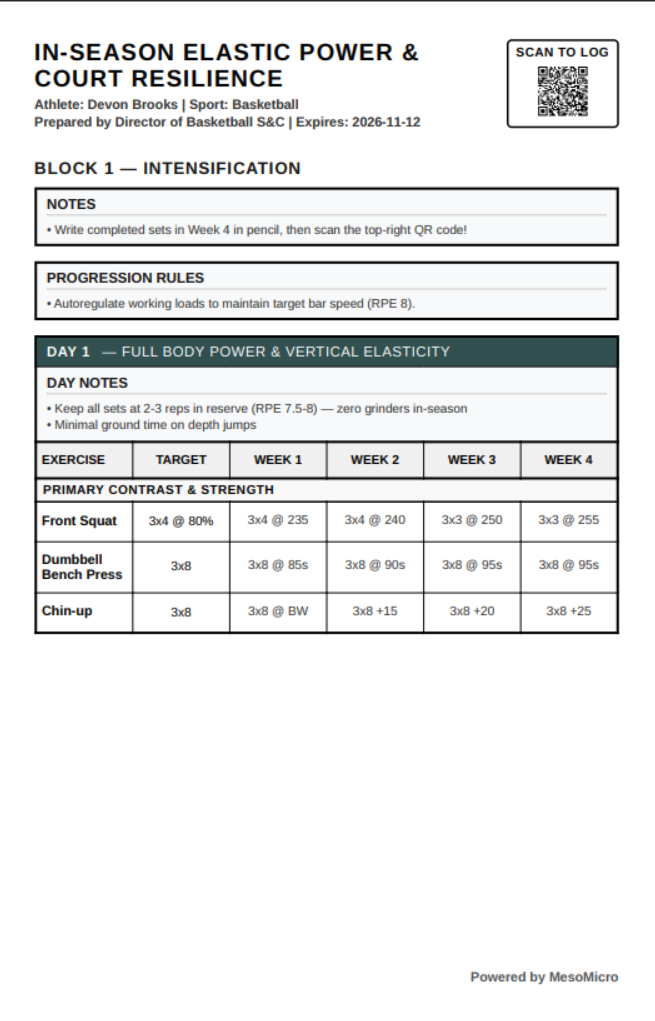
Skip the dropdown menus and exercise dictionaries. Type Squat 5x3 @ 80% straight into an uncluttered grid—or drop your old PDFs, spreadsheets, and whiteboard photos into the Magic Box to convert them in seconds. Print 5.5"×8.5" clipboard cards for the gym floor, snap a photo when the block is done to log handwritten actuals, and generate polished End-of-Block Progress Reports in minutes.
- No Dropdown Hell
- Type any lift or cue directly into the grid.
- Pencil & Paper Floor
- Print half-sheet or full-sheet clipboard cards.
- Photo & Barbell Logging
- Snap card photos or tap plates to log sets.
- Progress Reports
- Block summary PDFs & athlete analytics.
What is MesoMicro?
MesoMicro is a paper-first, intelligent strength and conditioning record-keeping system.
Modern gym software is great for analytics, but not so great for practice. Creating programs is difficult because it traps you in dropdown and clicking hell.
Logging at the gym is full of friction because athletes have to fidget with touchscreens, scroll, navigate menus, pinch, and toggle tiny keyboards in order to log data—while everyone's hands are sweaty or covered in gym chalk. That is a terrible user experience.
MesoMicro solves this by bringing back the unstructured speed of designing a program on paper and removing user interface clutter. And when a traveling or remote athlete does log on a phone, our "Load the Bar" input lets them log their weights just like they load the bar—tapping plates instead of fighting a tiny keyboard.
While MesoMicro is completely freeform on the surface, it quietly handles all of your industry reporting—working set volume, exercise-scoped tonnage waves, e1RM detection, and printable End-of-Block Progress Reports—without ever trying to replace the coach.
- • M.S. Health & Human Physiology (Anatomy & Motor Control)
- • NSCA Certified Strength & Conditioning Specialist
- • Competitive Powerlifter, Offensive Lineman & Movement Coach
No Dropdowns. No Dictionaries.
Type your exercises, specialty bar cues, targets, and weekly progressions directly into the table. Or paste raw text notes and old spreadsheets into the Magic Box to format a multi-week block in seconds.
Clipboard Cards & Photo Logging.
Print high-contrast 5.5"×8.5" half-sheet cards for the rack. At the end of a workout, week, or block, scan the card's QR code and snap a photo—MesoMicro reads the handwriting and fills in your digital log.
"Load the Bar" Mobile Logging.
No app downloads or passwords to forget. Scanning a card's QR link opens a thoughtfully designed mobile logger where lifters tap plates just like loading a bar, run the rest timer, and save sets offline.
Analytics & Progress Reports.
Turn raw training logs into working set volume, exercise-scoped tonnage charts, fatigue autoregulation alerts, and polished End-of-Block Progress Reports you can print or email to athletes and parents.
Built for the Way Strength Coaches Actually Work
Click through the workspaces below to see real screenshots of MesoMicro handling program writing, photo card scanning, "Load the Bar" mobile logging, end-of-block progress reports, athlete profiles, team printing, analytics, and optional remote coaching tools.
Write Programs at Typing Speed
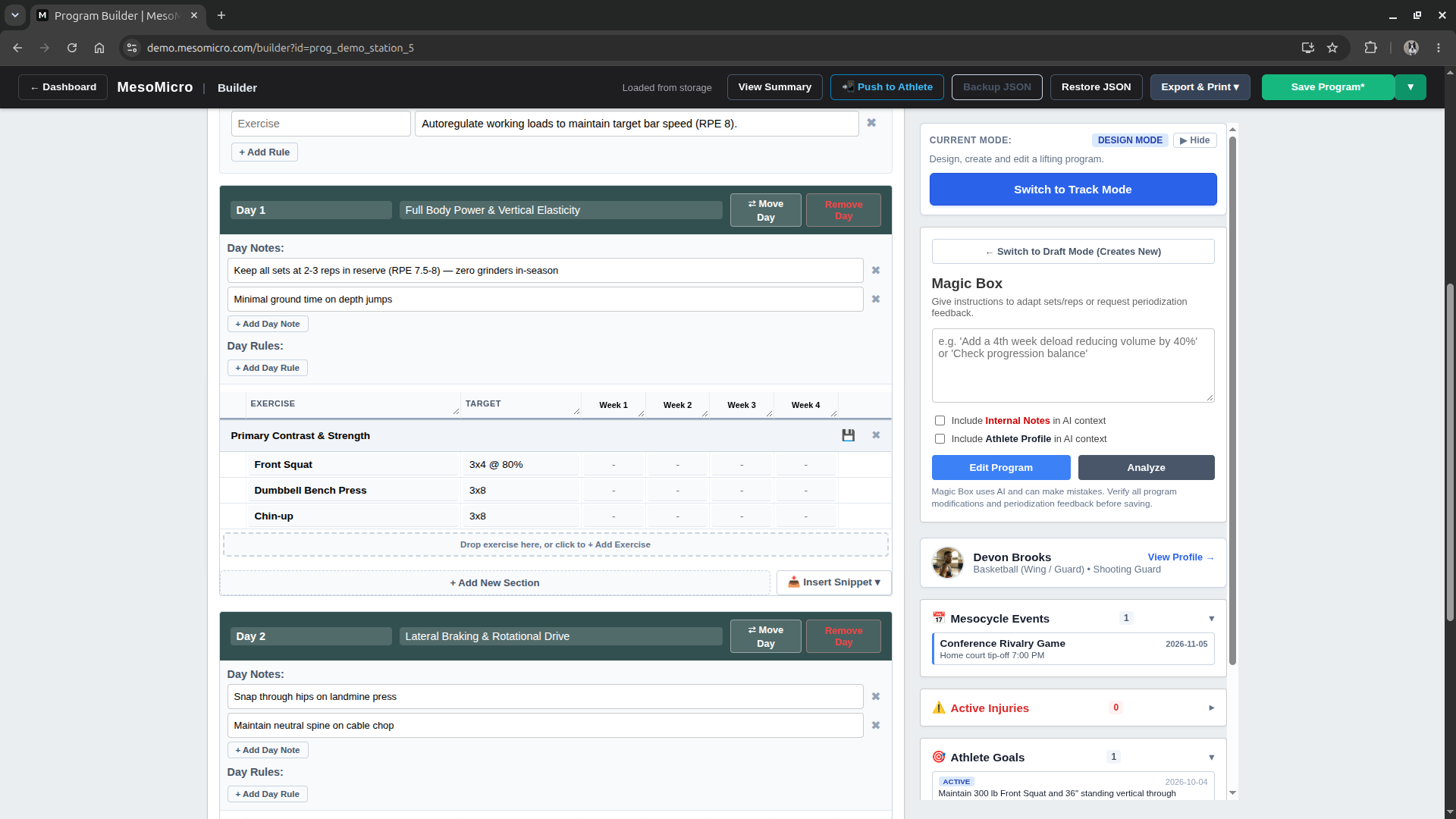
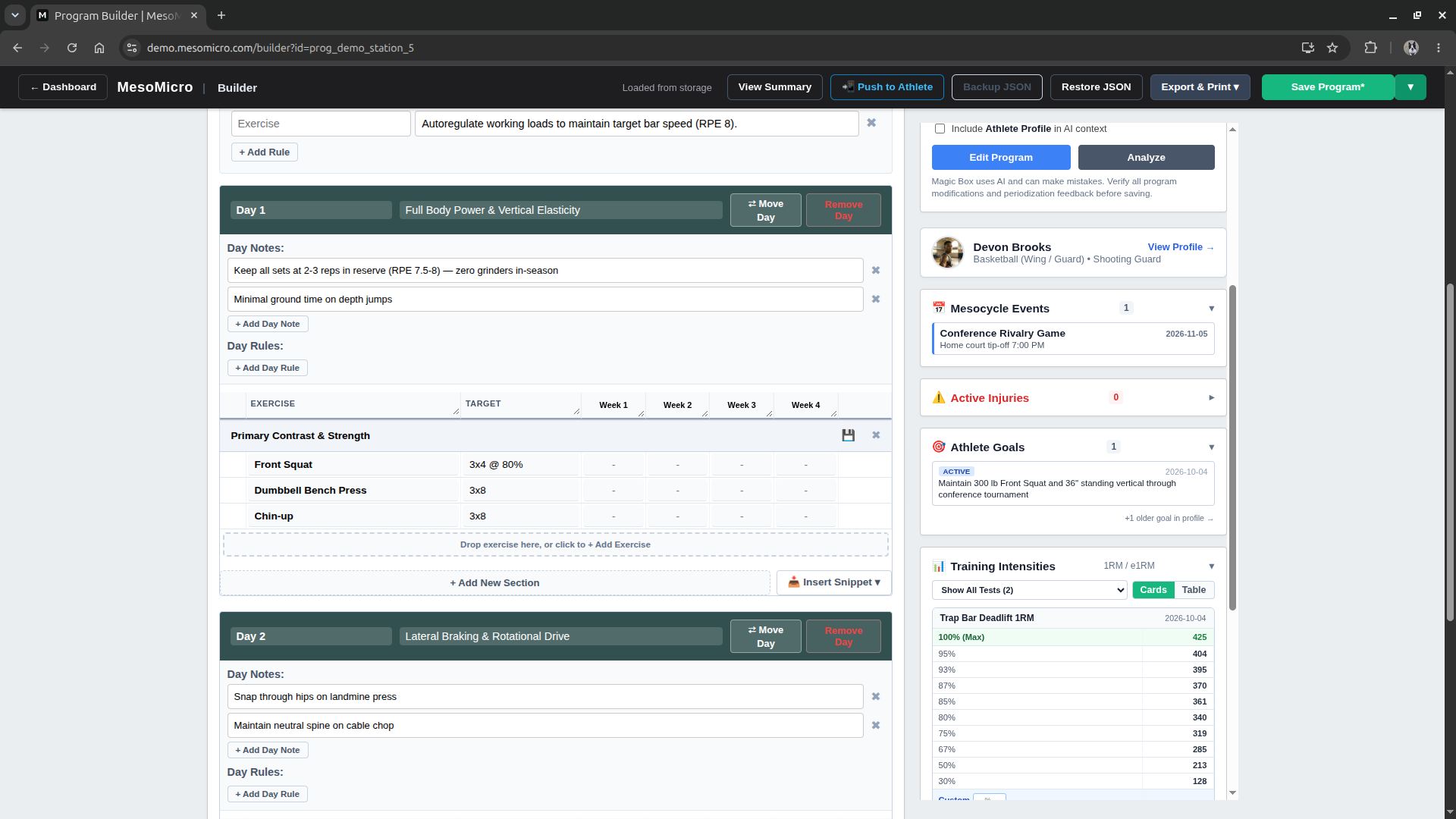
No dropdown menus or rigid exercise libraries. Type exercise names, specialty bar cues, set-rep targets, and weekly progressions directly into the table.
- ⚡ Automatic % Load Calculator: Type
3x5 @ 80%in your cells and click Resolve. MesoMicro checks the athlete's latest 1RM/e1RM test for that lift and fills in the rounded poundages (5 lbs,2.5 lbs, or1 kg/lb). - ↕️ Drag-and-Drop Block & Day Reordering: Rearrange training days, exercises, and blocks with simple drag-and-drop handles.
- 📥 Reusable Section Snippets: Save your favorite warm-up complexes, main lift waves, or prehab circuits into your snippet library and drop them straight into any workout day.
- ⚠️ Live Athlete Context Sidebar: Keep the athlete's active injuries, upcoming meet/game dates, goals, and 1RM percentage chart right beside the grid while you write.
Snap a Photo. Verify Side-by-Side in Seconds.
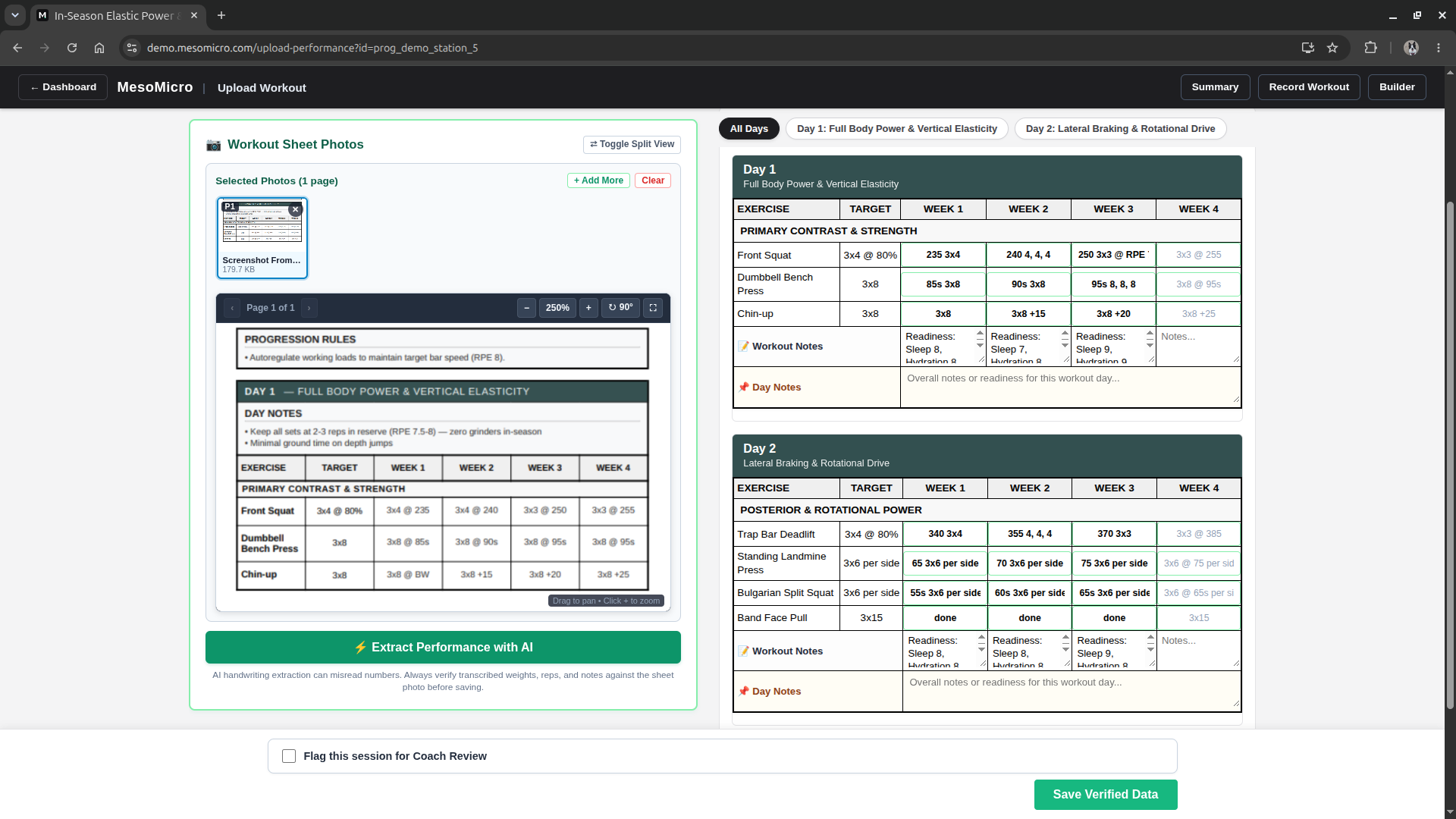
Athletes train on paper with zero phone distractions. When they snap a photo of their card, MesoMicro reads the handwriting and places the photo right next to a clean table layout that mirrors their paper card—highlighting every new entry in green.
- Safe Partial-Card Scanning: Scan just Day 1, or upload a photo after Week 2. MesoMicro only fills in the cells visible in the photo—other days and future weeks are never touched or erased.
- Reads Real Weight-Room Shorthand: Whether an athlete writes
3x5 @ 225,240 4, 4, 4,65 3x6 per side, or jots down readiness scores in Workout Notes, MesoMicro logs it cleanly. - Zoom, Pan & Day Filters: Inspect multi-page cards at 250% zoom, rotate sideways photos, filter by workout day, and optionally let athletes flag a session for coach review on upload.
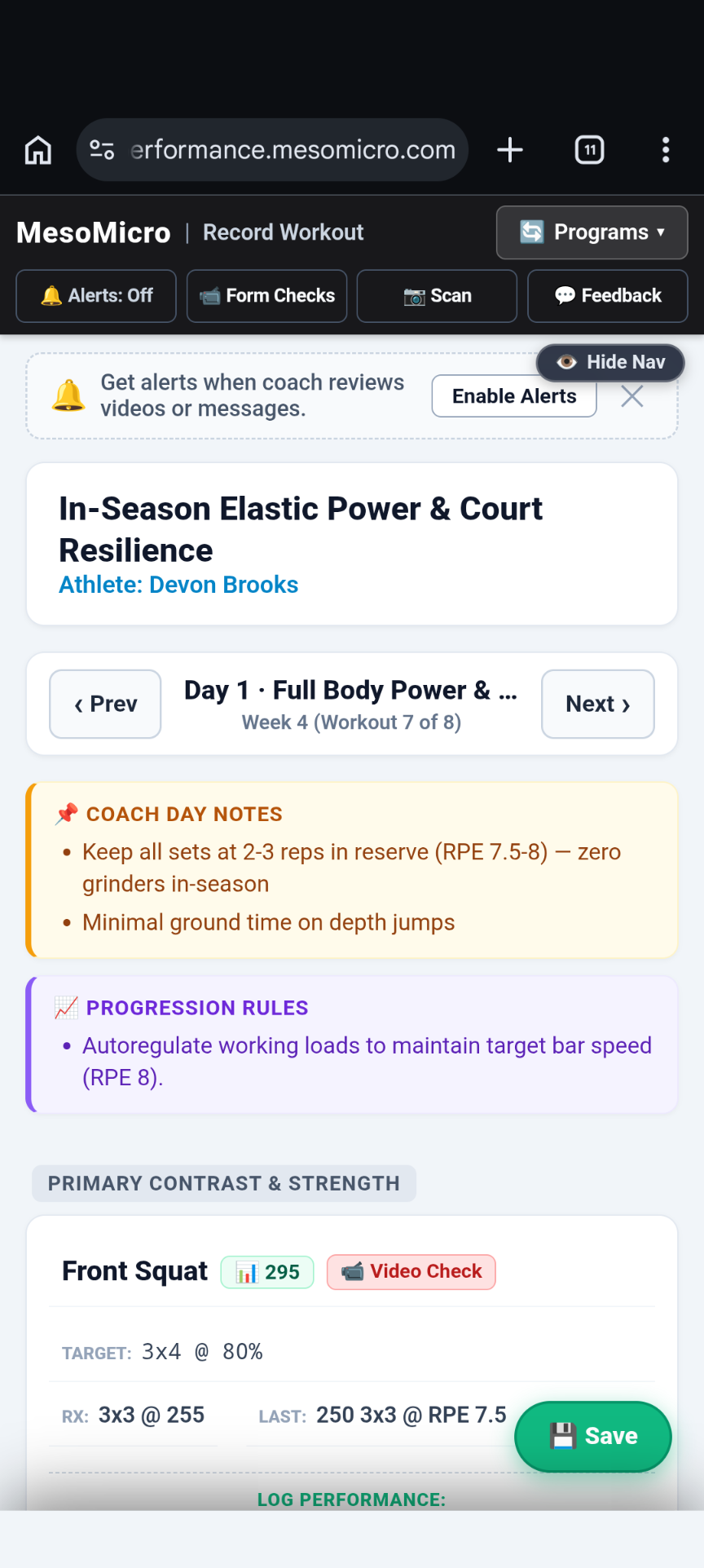
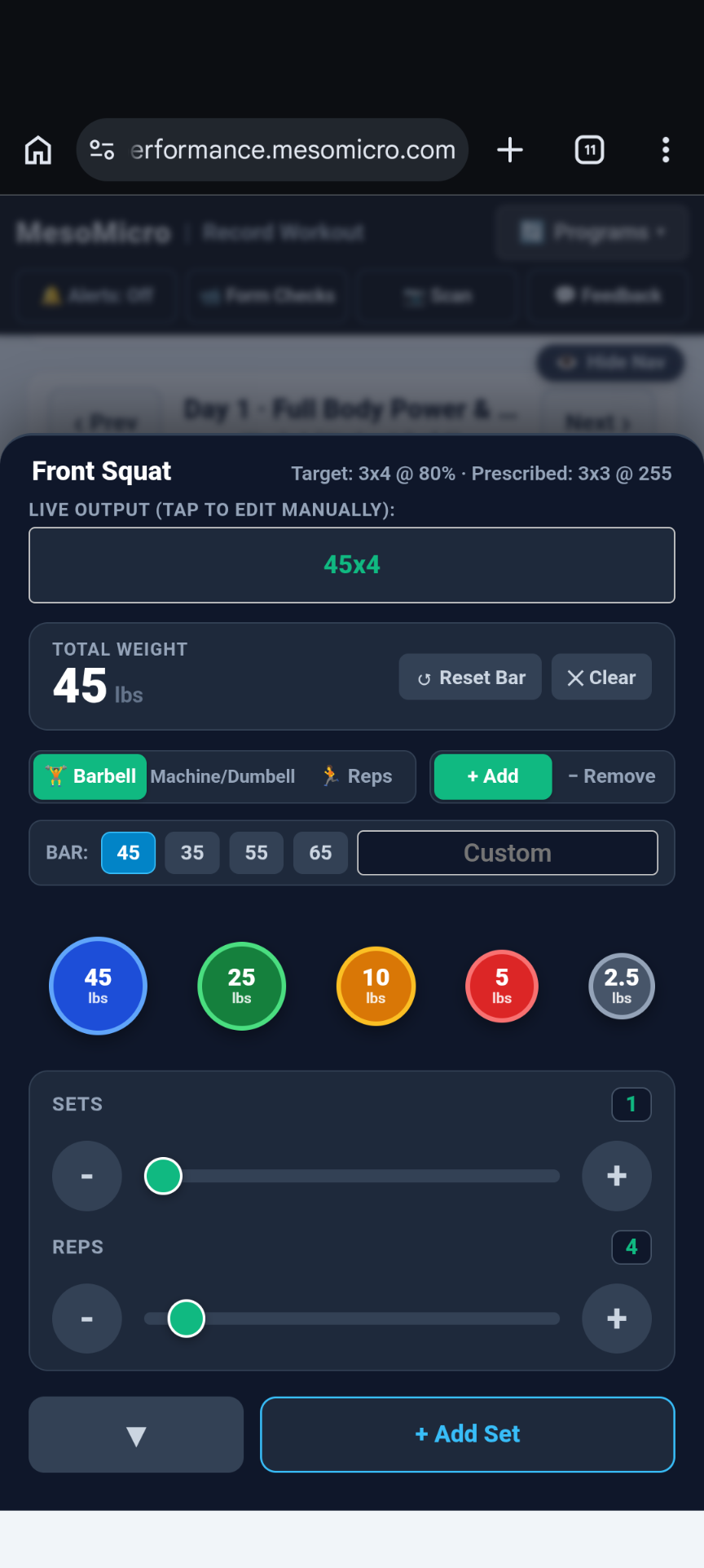
Log Your Weights Just Like You Load the Bar
Thoughtfully designed for traveling lifters, remote clients, or shared gym tablets. Instead of typing 425x3 on a tiny phone keyboard between heavy sets, athletes log their weights the exact way they load the bar.
- 🏋️ "Load the Bar" Input: Tap the
45,25,10,5, and2.5 lbplates you put on the bar, pick your bar weight (45,35,55,65), or switch to Machine/Dumbbell and Bodyweight Reps mode with quick✓ Doneand✕ Skipbuttons. - ⏱️ Built-In Set Counter, Rest Timer & % Popovers: Includes a tactile set counter with haptic feedback, a stopwatch/countdown rest timer with audio chime, and inline 1RM percentage popovers right inside each exercise row.
- 📡 Works Offline in Basement Weight Rooms: No Wi-Fi or cell signal in the gym? Workouts save right on the phone and sync automatically as soon as the athlete steps back outside.
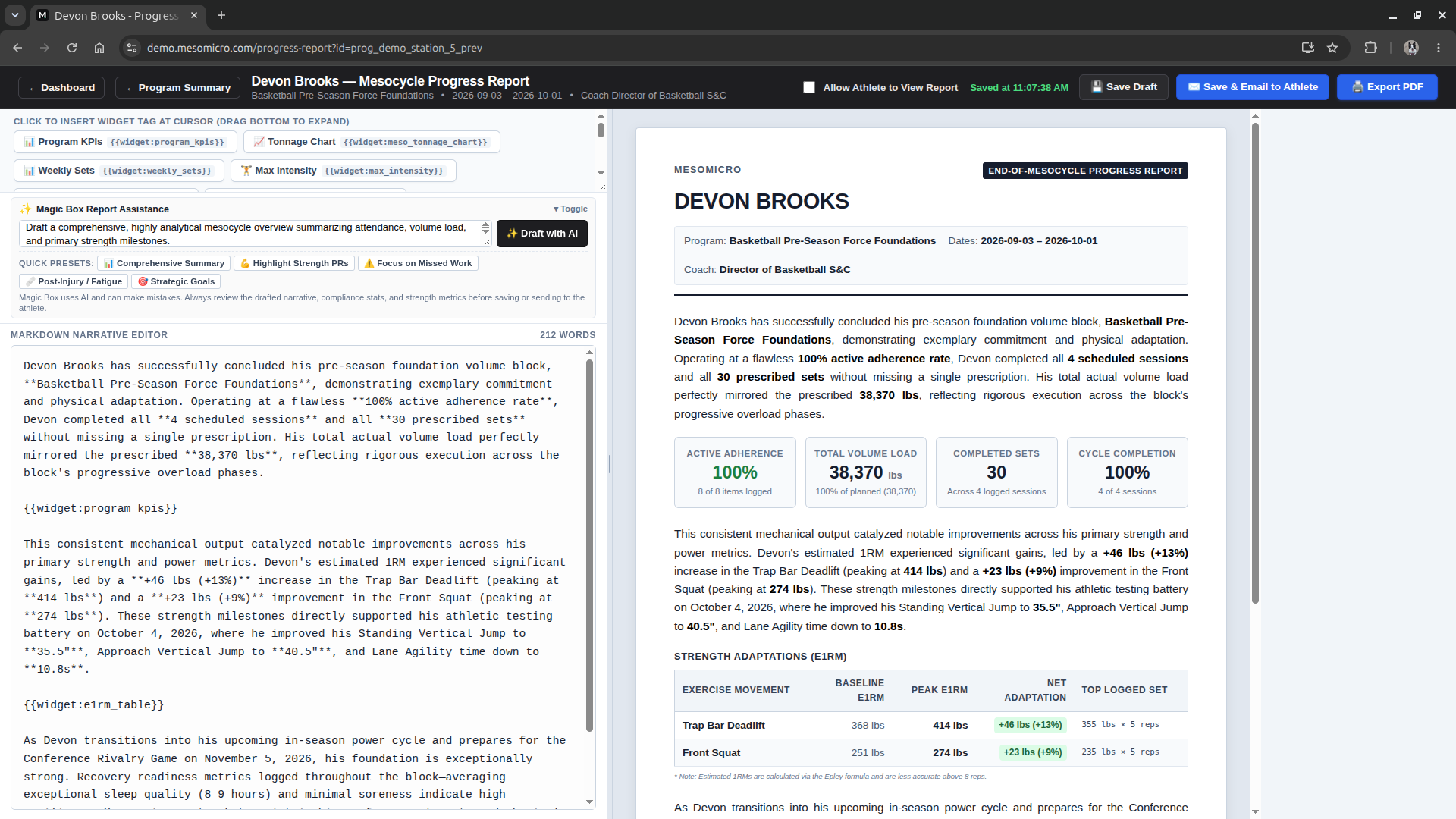
Generate End-of-Block Progress Reports in Minutes
Show athletes, parents, and sport coaches the exact return on their training investment. Build publication-grade progress reports at the end of every mesocycle without spending your Sunday copying charts into Word.
- 📊 17 Insertable Data Widgets: Drop live KPI summary cards, weekly tonnage & set charts, baseline-vs-peak e1RM tables, relative strength multiples, and missed-workout audits straight into your report.
- ✨ Magic Box Narrative Drafting: Jotted down three bullet points of rough feedback? Click Draft with AI (or pick a preset like Highlight Strength PRs or Post-Injury Progression) to weave the athlete's real stats into a cohesive coaching summary.
- 🖨️ Print PDF or Email a Live Link: Export a clean, letterhead-grade PDF handout or click Save & Email to Athlete to send a view-only link straight to their inbox.
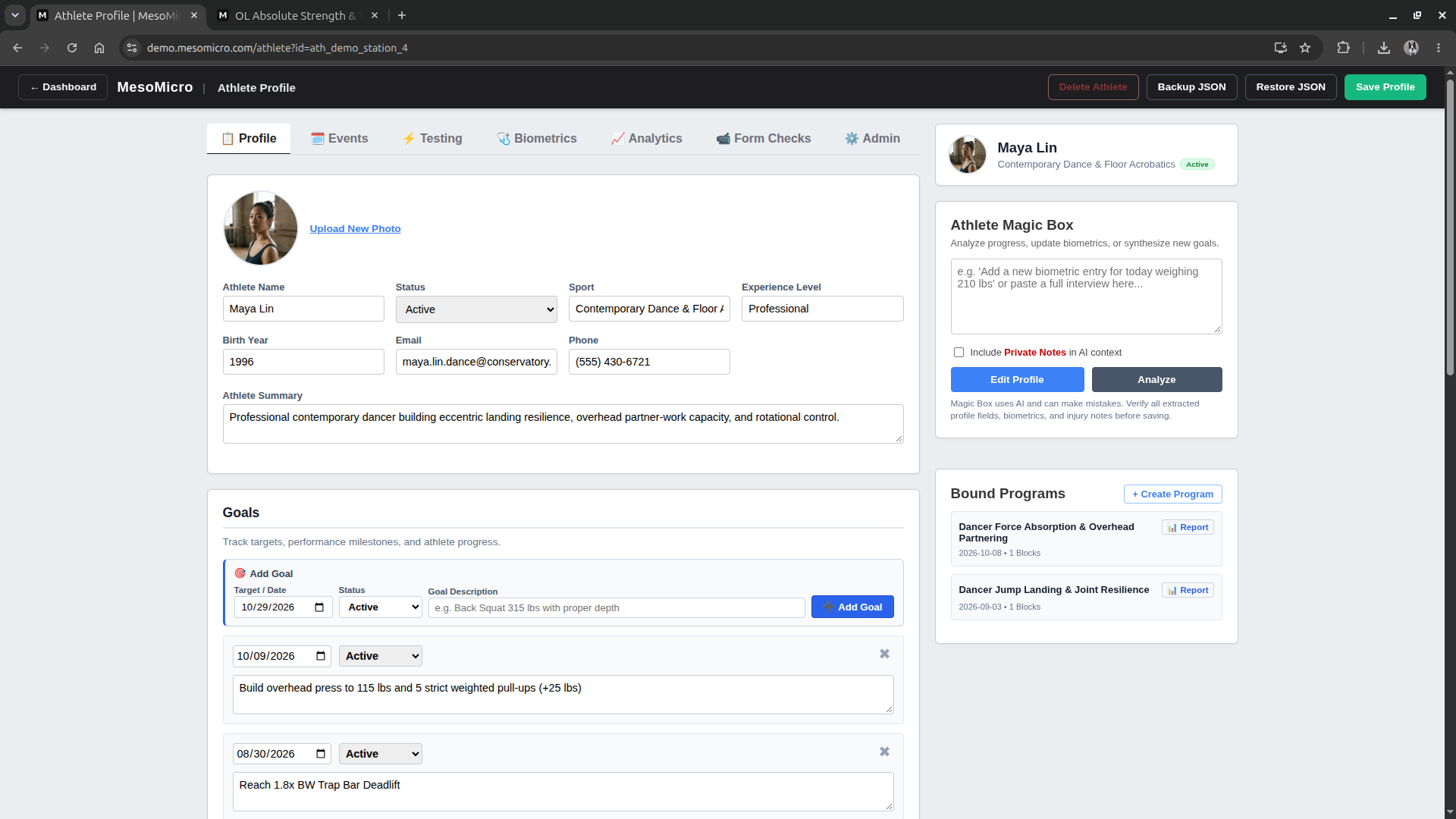
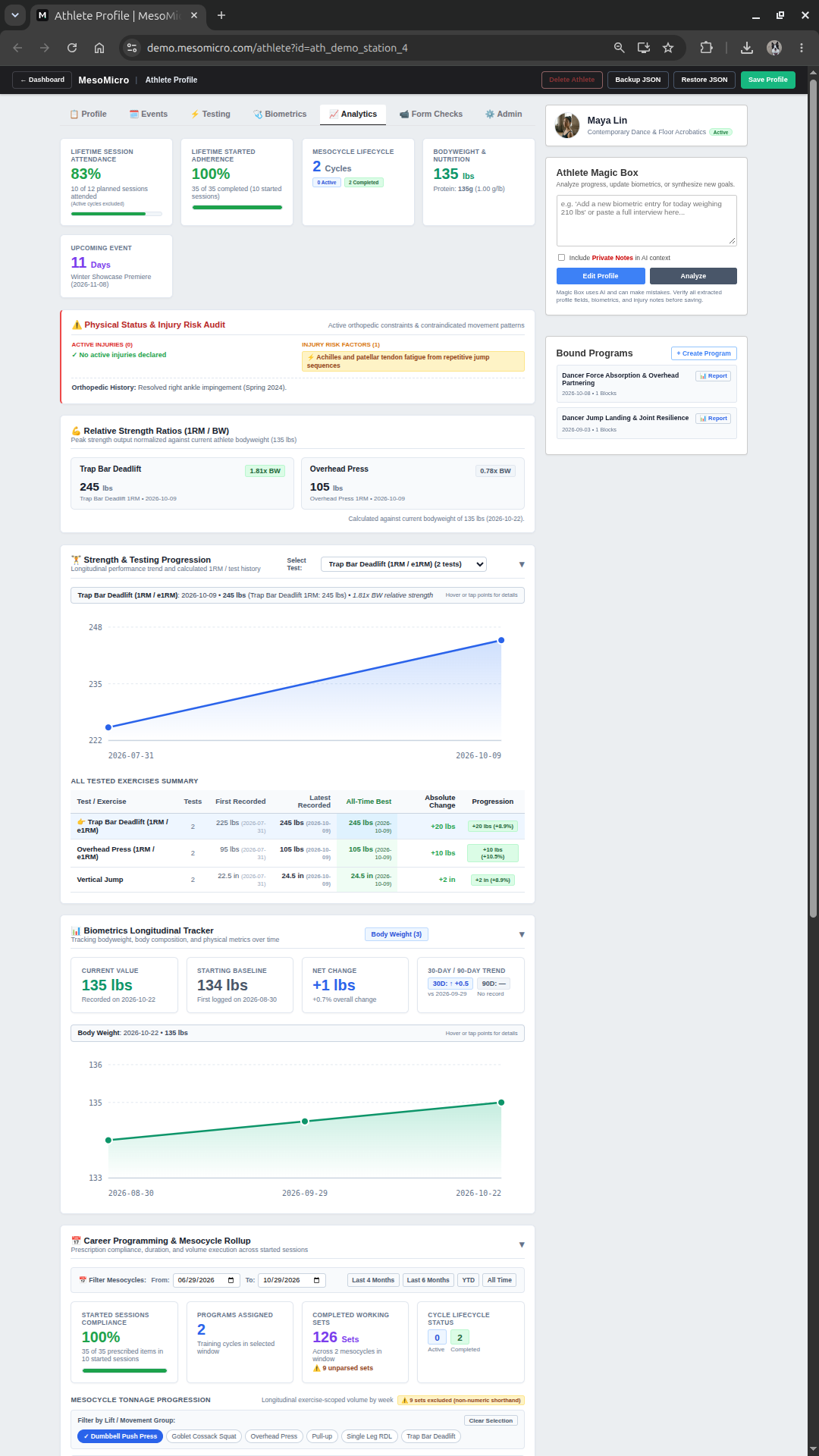
Complete Athlete Profiles & Testing History
Keep every athlete's sport needs analysis, active injury restrictions, competition dates, nutrition targets, bodyweight history, relative strength ratios, and combine/strength testing in one place.
- Instant Intake Form Import: Copy our built-in athlete intake form, send it to a new lifter, and paste their raw answers into the Athlete Magic Box to populate their profile, goals, and injury flags automatically.
- Dual Test Logger & Direct PR Saves: Log both a rep-max (e.g.,
455 × 3) and its estimated 1RM simultaneously—or save new PRs straight from a completed workout card into the athlete's profile. - Time-Aware Percentage Tables: Viewing an older, completed program automatically shows the athlete's 1RM percentages as they stood during that training cycle.
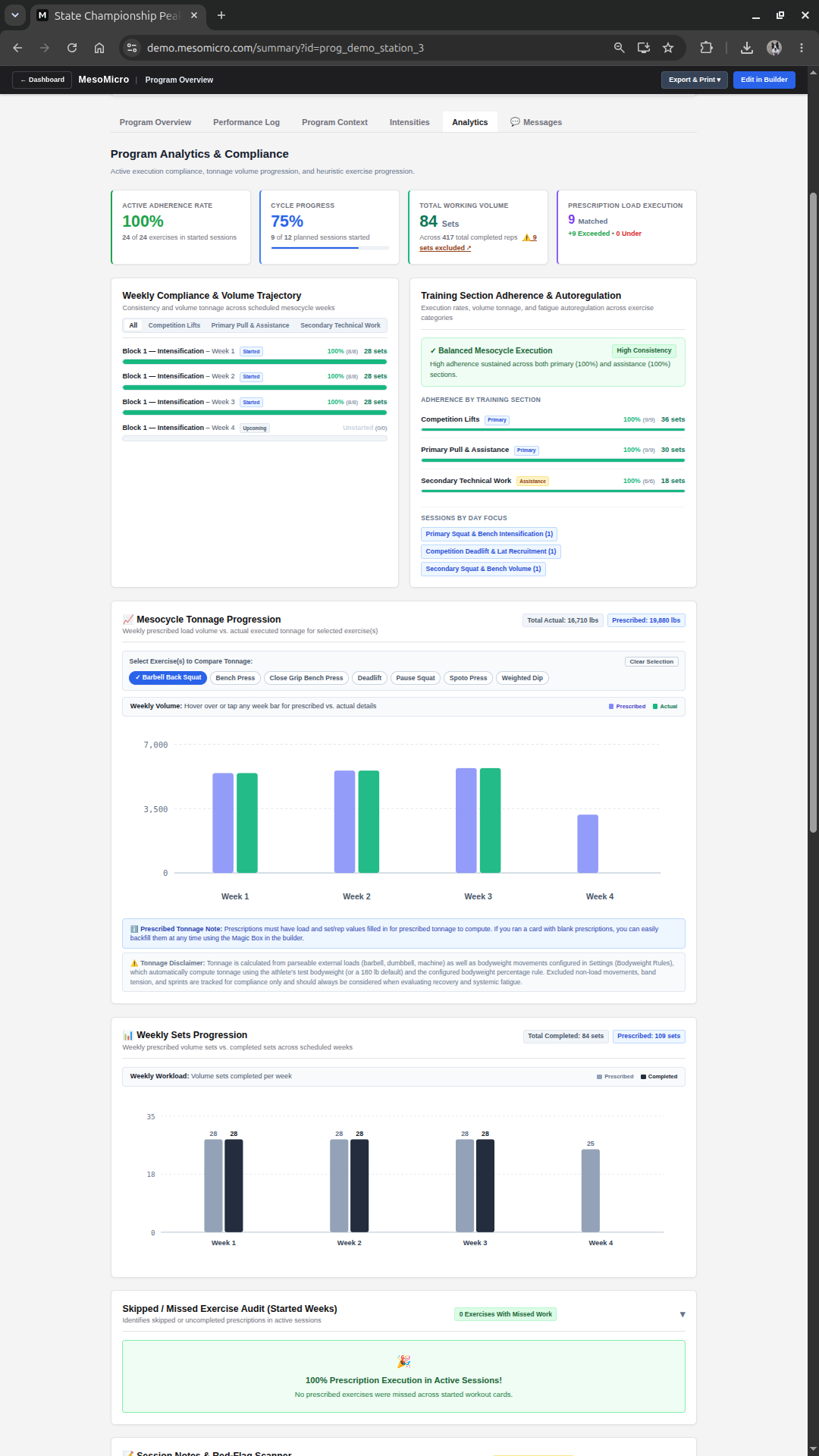
Meaningful Analytics, Fatigue Detection & Roster Audits
Adding leg press poundage to lateral raise poundage is sport-science theater. MesoMicro tracks Completed Working Sets for overall workload and scopes Volume-Load (Tonnage) strictly to individual lifts or movement groups you choose.
- ⚡ Section Autoregulation & Red-Flag Scanner: Automatically detects when an athlete hits 100% of their main lifts but starts skipping assistance work due to fatigue or time crunches, and scans session notes for pain/tweak keywords vs. PR wins.
- 🔄 Smart On-the-Fly Exercise Swaps: If a rack is taken and an athlete writes
Cable Row 160 3x8instead of Pendlay Rows, MesoMicro credits the volume toward their weekly compliance without letting the cable weight mess up their Pendlay Row PR history. - ✨ Roster Magic Box: Select 15 athletes at once to spot shared injury histories across a position group, compare squat/bench/deadlift set volume across your roster, or find movement gaps.
Run Group & Team Rosters Without Administrative Burnout
Assign a master template to an entire position group or barbell club, auto-calculate everyone's working weights from their individual 1RMs, and print the stack as one merged PDF.
- Bulk Template Assignment: Select 30+ athletes, set the cycle start and expiration dates, and let MesoMicro stamp out individualized programs with calculated poundages.
- Merged PDF Print Packets: Select all active programs on your dashboard and generate a single, print-ready PDF packet formatted for 5.5"×8.5" half-sheets or full pages.
- 📲 Optional Push-to-Phone Delivery: Coaching remote lifters too? Add the phone push module to send next month's program straight to their browser with a lock-screen alert.
Available Remote Tools: Form Checks, Review Flags & Alerts
Base MesoMicro stays lean for pure paper-and-clipboard weight rooms. For hybrid gyms and online coaches, these optional add-on modules unlock video technique reviews and asynchronous messaging—still without athlete accounts.
- 📹 Form Check Video Queue (Add-On): Athletes tap
📹 Video Checkon any exercise to send a set video. Watch it in your review queue, type your coaching cues, and pin feedback to their workout screen. - 🚩 Session Review Flags (Add-On): Athletes check a box on any workout or card upload to ask a question. Your reply pins a bright banner to the top of their workout until they tap
✓ Got it. - 🔔 Lock-Screen Push Alerts (Add-On): Get notified when an athlete submits a video or question, and alert lifters on their lock screen when you reply or push a new block.
Paper-First Core, Modern Features
Every MesoMicro install includes End-of-Block Progress Reports out of the box—and athletes never download an app or remember a password. Coaching remote lifters or hybrid rosters? Optional modules for video form checks, session review flags, and push alerts are available whenever your setup needs them.
Show Clear Proof of Progress.
Included with every MesoMicro install. Wrap up each block with a polished Athlete Progress Report combining adherence stats, tonnage charts, e1RM gains, and coaching notes as a PDF or live email link.
View Sample Report PDF →Watch Lift Videos & Send Cues.
Available for remote and hybrid coaching setups. Athletes tap Video Check on an exercise to upload a set video; you watch it in your queue and pin technical cues back to their workout.
Answer Questions Without Group Chats.
Available as an add-on to replace late-night texts and noisy DMs. Athletes check "Flag this session for Coach Review" when logging or scanning a card, and your reply pins to the top of their program.
Program Push & Lock-Screen Alerts.
Available for coaches delivering blocks digitally. Once an athlete scans their first QR code, opt-in notifications let you push next month's program or feedback alerts straight to their phone.
Why Do We Call It the Magic Box?
Because It Actually Works Like Magic.
The hardest part of switching strength software is migrating years of old programs. With the Magic Box, you never have to re-type a legacy template again—and you remain in 100% control of every edit.
📎 1. Dump In Any Format You Already Have
Drop in photos of old clipboards or gym whiteboards, PDFs, messy Excel/CSV spreadsheets, or raw text notes. The Magic Box immediately and accurately converts them into MesoMicro's clean, editable block-and-week format.
⚡ 2. Fast Edits on Command (With Accept / Revert Safety)
Need to adapt a block fast? Tell the Magic Box: "Add a Week 4 deload reducing set volume by 40%" or "Copy Week 1 prescriptions to all weeks." Every changed cell is highlighted in blue with an explicit Accept / Revert confirmation gate so nothing is ever changed behind your back.
🧠 3. Second-Pair-of-Eyes Periodization & Report Drafting
Ask the Magic Box to audit your block against the athlete's profile, turn a raw athlete intake interview into a structured profile, or draft a polished end-of-cycle narrative from your rough coaching notes.
| Exercise | Target | Week 3 (Peak) | Week 4 (Deload) |
|---|---|---|---|
| Swiss Bar Neutral Bench | 4x5 | 4x4 @ 85% | 3x5 @ 65% |
| Chest-Supported Row | 4x10 | 4x10 @ RPE 8.5 | 2x10 @ RPE 6.5 |
Customize Every Detail of the Printed Workout Card
Toggle the checkboxes below—taken directly from MesoMicro's print menu—to see how coaches format cards for half-sheet clipboards, ink-saver printing, autoregulated progressions, or novice lifters.
| Exercise | Target | Week 1 | Week 2 |
|---|---|---|---|
| Competition Squat | 3x2 @ RPE 8.5 |
Rx: 440 lbs | Rx: 455 lbs |
| Competition Pause Bench | 4x2 @ RPE 8 |
Rx: 295 lbs | Rx: 305 lbs |
MesoMicro vs. Tablet Kiosk Apps & Spreadsheets
| Coaching Workflow | MesoMicro | Team Tablet / Mobile Apps | Excel / Google Sheets |
|---|---|---|---|
| Prescribing Specialty Bars, Chains & Custom Cues | Type any string directly into the cell | Must create custom items in exercise dictionary | Freeform text, no athlete profile linkage |
| Migrating Old PDFs, Spreadsheets & Whiteboard Photos | Drop into the Magic Box → instant structured blocks | Rebuild every exercise and week manually | Manual copy-paste and cell reformatting |
| Gym Floor Athlete Experience | 5.5"×8.5" clipboard card & pencil (+ "Load the Bar" mobile logging when needed) | Phones in hand, tiny keyboards, or lines at wall iPads | Awkward multi-page paper printouts |
| Getting Paper Logs Into the System | Snap photo → OCR reads handwriting into your table | Manual phone typing between every set | Hours of manual coach typing (or tossed in a drawer) |
| End-of-Block Athlete & Parent Progress Reports | Built-in Progress Report Studio (17 live data widgets + PDF & email link) | Basic app screenshots or manual exports | Hours of manual chart building in Word/Docs |
| Form Check Videos & Technique Feedback | Optional Form Check Video Queue add-on + pinned coach feedback banners | Clunky in-app social feeds or separate text message threads | None (requires texting videos separately) |
| Athlete Questions & Session Feedback | Optional "Flag for Coach Review" add-on + pinned coach reply (no chat clutter) | Noisy DM inboxes, emojis, and endless notifications | Easy-to-miss cell comments |
| Sending Next Month's Block to Athletes | Print fresh cards (or optional Push-to-Phone alert add-on) | Requires App Store install, login, and password resets | Emailing new spreadsheet links every 4 weeks |
| Printing 35 Individualized Team Cards | Bulk Template Assign + % Resolver + Merged PDF | Weak print formatting; built for screens | Duplicate 35 tabs & fix broken formula references |
| Rolling Into the Next 4-Week Block | Automated Cycle Rollover (promotes Week 4 actuals to Week 1) | Re-build or manually copy weights athlete by athlete | Copy-paste columns & manually clear cells |
| Data Ownership | Direct JSON Backup & PDF Archives | Locked inside proprietary cloud database | Local spreadsheet files |
Pilot MesoMicro in Your Weight Room
I am partnering with a small group of barbell gyms, independent strength coaches, and sports teams to run MesoMicro on the gym floor. Every pilot is tailored to your coaching setup—reach out below to see it in action and discuss a setup for your roster.
Facility Collaboration
Own an independent barbell gym or performance facility in the greater Madison/Verona area? Let's collaborate to bring paper-first programming and photo card logging to your floor through a mutually beneficial facility partnership.
- ✓ Eliminate phones on the floor while keeping full digital training logs
- ✓ Hands-on onboarding and custom workout card setup for your facility
- ✓ Collaborative trade terms tailored for local gym owners
Founding Coach Pilot
Built for strength coaches who want to stop fighting spreadsheets and rigid exercise dropdowns. Convert your existing programs in minutes, cut your weekly programming time in half, and send polished progress reports to every client.
- ✓ Instant migration of your old PDFs, spreadsheets, and notes
- ✓ Progress Reports included, plus optional Form Check & Push add-ons
- ✓ Direct input on new coaching features during the pilot
Single-Team Roster Pilot
Run your entire team on individualized paper workout cards for a full off-season or in-season cycle. Give every athlete weights calculated from their own maxes without lines at an iPad or distractions in the rack.
- ✓ Print individualized team workout packets as one merged PDF
- ✓ End-of-block photo transcription, progress reports & team volume audits
- ✓ Hands-on support for your coaching staff throughout the season
Frequently Asked Questions
What happens if I only photograph Day 1 of a card, or an athlete swaps an exercise mid-workout?
MesoMicro only updates the exact cells visible in your photo—unpictured days and future weeks are never touched or erased. And if an athlete writes an on-the-fly swap (like Cable Row 160 3x8), MesoMicro credits their weekly volume without letting that weight mess up their prescribed barbell lift's PR history.
How do End-of-Block Progress Reports work?
Progress Reports are built right into base MesoMicro. At the end of a training cycle, open Progress Report on any program for a split-pane studio with 17 live data widgets (adherence KPIs, tonnage & set charts, e1RM tables, relative strength ratios, and missed-workout audits) plus AI narrative assistance. Export a print-ready PDF handout or email a view-only link straight to the athlete.
What is included in Base MesoMicro vs. optional add-ons?
Base MesoMicro includes the full Program Builder, Magic Box conversions, Athlete Profiles, Bulk Printing, Photo Card OCR, "Load the Bar" mobile logging, Analytics, and End-of-Block Progress Reports. For hybrid and remote coaches, Form Check Video Queues, Session Review Flags, and Lock-Screen Push Alerts are available as optional modules—and work right off the card's QR code without athlete logins.
What if a lifter is traveling without their paper card or logging on a shared gym tablet?
Scanning their QR link opens a thoughtfully designed mobile workout logger with our "Load the Bar" input, built-in set counter, and rest timer—lifters tap the plates they put on the bar instead of typing on a keyboard, and workouts save offline in basement gyms. On a shared rack iPad, you can turn on Shared Gym Tablet Mode so sessions clear automatically after 5 minutes.
Can athletes see my private coaching or injury notes when they scan the QR code?
Never. When an athlete scans their QR code, they only see their own workout prescriptions, logged sets, and feedback you've sent them. Private coach notes, internal injury histories, and other athletes' profiles remain locked inside your private coach dashboard.
Am I locked into MesoMicro if I decide to stop using it?
Never. Every athlete profile and training program includes direct Backup JSON and PDF Export buttons. You own 100% of your coaching data in clean, human-readable files.